Colliz - DIY Wallpaper Craft
- 3.6
- Rating
- 10.00M
- Installs
- Free
- Price

 Analysis by App-foxy
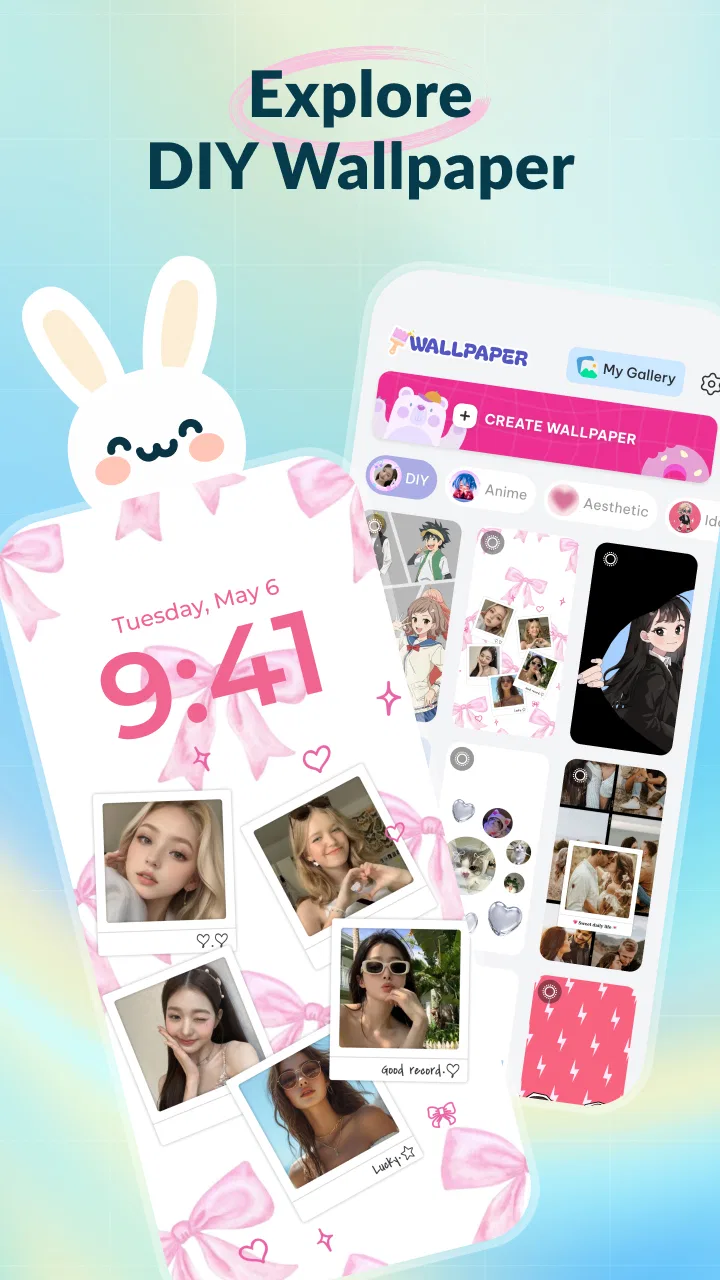
Colliz - DIY Wallpaper Craft is a personalization app from Braly JSC that combines wallpaper decoration with photo-collage ideas. I approached it as someone who likes changing a phone’s look without spending an evening learning a complicated design tool. The central appeal is simple: start with a photo or a visual idea, add a handmade-style treatment, and turn the result into something more personal than a standard wallpaper.
That sounds narrow, but it gives the app a useful place between ordinary wallpaper catalogs and full photo-editing software. A wallpaper catalog is quick but often feels repetitive. A serious editor offers far more control, yet can be excessive when all I want is a coordinated lock screen, a small collage, or a playful background for a particular mood. Colliz aims at that middle ground, with a focus on DIY craft aesthetics, collage composition, and current visual trends.
The app sits in the personalization category and is free to install. Its age rating is Everyone, so it is positioned as an accessible creative tool rather than a specialist design product. Braly JSC has also released it for devices running Android seven or later, which keeps it available to a broad range of phones. In everyday use, that matters because wallpaper tools are often installed on older secondary phones as well as newer main devices.
You May Also Like

 Pandora - Music & Podcasts
Pandora’s Music Is Easy to Start, but Harder to Recover
Pandora’s strength is its low-effort path from a seed to a station. Its weak spot is how much confidence it asks you to place in connection, setup, and quiet recovery.

 8 Ball Pool
 Is Built on Rivalries, Rematches, and Routine
A close look at the rivalries, rematches, shared routines, and unanswered safety questions that turn a quick pool match into a persistent mobile community.

 Samsung Music
’s Quiet Strength Is Playing What You Already Own
Its reach comes less from spectacle than from dependable access to a personal library. That simplicity is both the app’s strongest retention engine and its ceiling.

 AccuWeather: Weather Radar
AccuWeather Review: A Quick, Clear Forecast for Everyday Decisions
For everyday plans, the best forecast is the one you can understand quickly. AccuWeather makes rain timing, radar, and local conditions easy to act on, with a few trade-offs.

 Hill Climb Racing
Why Hill Climb Racing Still Turns Crashes Into One More Run
A tiny car, a bumpy hill and one more upgrade: Hill Climb Racing keeps resurfacing because its simple chaos makes every near-miss feel personal.

 AliExpress - Shopping App
AliExpress Makes Global Shopping Feel Personal, but Shoppers Bear the Risk
AliExpress turns a global marketplace into a pocket-sized discovery engine. Its reach is useful, its shopping loop compelling, and its trade-offs easy to miss.
More From Our News Desk
View All News


How Colliz fits into everyday wallpaper creation
The first thing I noticed about this kind of app is that its usefulness depends less on how many decorative elements it offers and more on how quickly it helps me make a decision. When I open a wallpaper app, I usually already have a practical goal: refresh a tired home screen, prepare a birthday-themed background, arrange several travel photos, or create a matching image for a new phone case. Colliz makes sense when the goal is personal expression rather than simply finding a ready-made picture.
The DIY angle is especially relevant for people who enjoy scrapbook-inspired visuals. Instead of treating a photo as a finished image, I can think of it as a base layer for a small composition. A favorite photograph can become one part of a collage, while a second image, a decorative detail, or a trend-led visual direction gives the final wallpaper more character. That approach is more flexible than downloading the same popular background everyone else has.
I would not describe it as a replacement for a professional design suite. The attraction is the focused experience. A professional editor is better when I need exact typography, careful color correction, layered masking, or a design that must be reused across several formats. Colliz is more appealing when I want a result that feels casual, handmade, and ready for a phone screen without building everything from scratch.
One practical workflow is to begin with a single image that already has a clear subject. I would leave enough quiet space around that subject for icons or the clock, then build the decorative part away from the busiest area. This is a small but important distinction between an attractive collage and a wallpaper that becomes difficult to read. The app’s creative focus encourages experimentation, but the phone’s interface still needs visual breathing room.
Another useful approach is to create separate versions for the lock screen and home screen rather than forcing one image to do both jobs. A lock screen can tolerate a stronger central composition because it is viewed briefly, while a home screen needs calmer areas behind app icons. Even if I use the same source photo, changing the arrangement gives the phone a more considered appearance. That is a better use of a collage tool than simply covering every available space with decorations.
The trend-oriented side of the app can also help when I have no clear starting point. Looking through current ideas is useful for discovering combinations I would not normally try, such as mixing a personal photo with a paper-like or scrapbook-inspired arrangement. The trade-off is that trends can date quickly. I prefer borrowing the structure of a trend and replacing its central image with something meaningful to me. That keeps the result personal instead of making it look like a temporary imitation.
Free access and the real question of value
Colliz is free to install, which makes trying its basic creative direction relatively easy. I can explore the concept before deciding whether it deserves a permanent place on my phone. That is important for a personalization app because taste is subjective: a feature that sounds appealing in a description may not match the way I actually decorate my device.
The app also includes in-app purchases priced from $5.99 to $29.99 per item. Those are meaningful price points, so I would not treat every optional purchase as an automatic bargain. The right question is whether I use the app often enough, and whether the paid material or functionality gives me a result I could not get comfortably from the free experience or from another tool I already own.
For occasional wallpaper changes, the free entry point may be enough to test the workflow and decide whether the style suits me. For someone who regularly creates themed backgrounds, maintains several devices, or enjoys building collages as a hobby, paid options may feel more reasonable if they noticeably expand the creative range. I would still judge each purchase individually rather than assuming that a higher price guarantees a better result.
This distinction matters because wallpaper creation has many inexpensive alternatives. A basic photo editor can handle cropping and simple layouts, while a wallpaper app can provide instant backgrounds with almost no effort. Colliz earns its place when its particular craft-and-collage approach saves me time or produces a look I would struggle to assemble elsewhere. If I only want a plain photo, a solid color, or a quick scenic image, paying for extra creative material would be difficult to justify.
With an average rating of 3.0 from around 2.4 thousand ratings, I would approach the app with realistic expectations rather than assuming it will satisfy everyone. That does not tell me exactly why individual people rated it as they did, but it does suggest that the experience may feel uneven depending on expectations, device, or preferred style. The app has passed the five-million-install mark, so it has attracted a substantial audience, yet popularity alone is not proof that its workflow will suit my habits.
What makes the experience useful beyond a simple wallpaper download
The strongest value is the shift from choosing to composing. A normal wallpaper app asks me to browse until I find something acceptable. Colliz gives me a reason to start with my own material and make a visual decision. That is particularly useful for family photos, pet pictures, holiday snapshots, or images connected to a personal project. The final background can feel more relevant because I had a hand in arranging it.
It can also work as a lightweight visual planning tool. For example, if I am preparing a mood board for a room refresh, a trip, or a small creative project, a phone collage gives me a convenient way to keep those images visible. I would not use it as a substitute for a full presentation or organized file system, but a carefully made wallpaper can keep a theme in front of me during the day.
A less obvious benefit is that the collage format can rescue photos that are attractive but awkward as full-screen wallpapers. A portrait image may leave large empty areas when stretched across a phone. Placing it inside a broader composition can preserve the subject without forcing an uncomfortable crop. Likewise, several vertical photos can be arranged together instead of sacrificing important parts of each image to fit one background.
I also find value in designing around visibility rather than decoration alone. A photo with a bright sky may look beautiful, but white icons can disappear against it. A collage lets me move the visual weight away from the icon area or create a calmer region behind the interface. This is a practical design advantage that is easy to miss when judging screenshots only for their artistic appearance.
For users who share a device with children or relatives, the Everyone rating makes the app feel broadly approachable. It is suitable for casual creative exploration without presenting itself as a specialist tool aimed at a narrow age group. I would still supervise any creative activity involving personal photos, especially when the finished image may later be shared, but the app’s positioning is clearly general-purpose personalization.
Where the trade-offs become noticeable
The first trade-off is control versus speed. A focused wallpaper app can help me reach a finished image faster than a complex editor, but that convenience usually comes with fewer opportunities for precise adjustment. If I care about exact spacing, custom lettering, detailed retouching, or a repeatable brand style, I would rather use a dedicated design application and then set the exported image as my wallpaper.
The second trade-off is originality versus trend appeal. Trend-based inspiration is useful when I feel stuck, but popular visual patterns can make several wallpapers look similar. My solution is to use the trend as a starting structure, then change the photo selection, balance, and empty space. Users who want completely distinctive artwork may find the trend emphasis less appealing than a blank canvas.
There is also a time trade-off. Downloading a finished wallpaper takes seconds. Making a collage asks me to choose images, test the arrangement, check how icons sit over it, and possibly revise the result. That extra effort is worthwhile when the personal connection matters, but not when I need a background immediately before leaving home. Colliz is a creative utility, not always the fastest route to a finished screen.
The purchase range creates another decision point. Since optional items can reach $29.99, I would avoid buying impulsively just because a style looks attractive in a preview. A sensible method is to use the free experience for a few real projects first. If I keep returning to the app and repeatedly feel limited, a purchase may have clearer value. If I only open it once every few months, the free access and a regular photo editor may be the better combination.
Storage and visual clutter are practical concerns too. Collages encourage saving multiple variations, but keeping every experiment can make it harder to find the version I actually want. I recommend naming or organizing finished images outside the creative session, especially if I make separate backgrounds for different seasons or events. The more often I create, the more important that small habit becomes.
Finally, the app’s rating suggests I should test it on my own phone rather than relying on its broad install count. Wallpaper tools are sensitive to screen proportions, icon layouts, and personal taste. A composition that looks balanced on one device may place its main subject under a clock or notification area on another. I would always preview the result in the actual home-screen context before treating it as finished.
Who is most likely to get lasting value
I think Colliz is a good match for someone who changes wallpapers regularly but wants more personality than a download catalog provides. It is also suited to people who enjoy scrapbook-like design, photo arrangements, and visual experimentation without wanting to learn a full professional editor. If I already keep a folder of favorite photos and like turning them into small themed compositions, the app’s purpose is easy to understand.
It may be especially useful for a realistic everyday situation: I return from a weekend trip with several good photographs but no single image that works as a full-screen background. I can choose one landscape, one detail shot, and one candid portrait, then arrange them so the home-screen icons sit over a quiet section. The result preserves more of the trip than a single crop would, while giving the phone a personal update that takes less effort than building a polished poster.
Parents, students, and casual creators may also appreciate the low-pressure nature of the format. A collage does not need to look professionally designed to feel successful. It can mark a birthday, a new semester, a favorite season, or a personal goal. The app is more valuable when the meaning of the images matters as much as the decoration.
On the other hand, I would skip it if my only requirement is a large library of ready-to-use backgrounds. A conventional wallpaper service will probably get me to a result faster. I would also choose a more advanced editor for client work, precise typography, layered compositions, or graphics that need to look identical across multiple screen sizes.
People who dislike changing their phone’s appearance may not get much from it either. Personalization apps reward repeated use; their value comes from making several small creative decisions over time. If I set one wallpaper and leave it unchanged for years, the free installation is easy to try, but the paid range is unlikely to make sense unless the app offers a very specific style I cannot find elsewhere.
My recommendation after weighing the cost and compromises
My view is that Colliz is worth trying as a free personalization app, especially if the idea of making DIY-style photo wallpapers sounds more appealing than browsing generic backgrounds. Its best quality is not simply adding decoration; it encourages me to treat the phone screen as a small canvas and to adapt personal photos to the practical limits of icons, clocks, and screen space.
I would be more cautious with the in-app purchases. A price between $5.99 and $29.99 per item can be worthwhile for a frequent creator who genuinely uses the added value, but it is too much to justify casually for an occasional wallpaper. I would first complete several projects, compare the results with what I can make in my usual photo editor, and only then decide whether a purchase improves my routine.
Version 1.1.9 gives the app a clear current version to look for when installing, while its Android seven-or-later support makes it practical for many devices. The developer is Braly JSC, and the app has reached over five million installs, which shows that the concept has broad interest. Still, my recommendation depends more on the creative fit than on those reach indicators.
My final advice is simple: install it if you want to design personal collage wallpapers, but skip paid extras until the free workflow proves that you will return to it. Colliz is not the universal answer for every wallpaper need. It is a specialized middle option: more expressive than a basic wallpaper download, less exact than a full design suite, and most rewarding when I want my home screen to reflect a particular photo, memory, or mood.
FAQs for Colliz - DIY Wallpaper Craft
01What is Colliz - DIY Wallpaper Craft and how does it work?
Colliz - DIY Wallpaper Craft is a creative app designed for users to create custom wallpapers for their devices. It offers a wide range of tools and templates to help users craft unique designs by combining photos, patterns, and text. The app’s intuitive interface makes it easy for both beginners and experienced users to design personalized wallpapers.
02Is Colliz - DIY Wallpaper Craft free to use?
Colliz offers a free version with basic features, but it also includes in-app purchases for premium tools and templates. These premium features provide additional design options and enhanced customization capabilities, allowing users to unlock more creative potential. Users can choose to purchase these individually or through a subscription model.
03What are the main features of Colliz - DIY Wallpaper Craft?
Colliz boasts a variety of features including customizable templates, a vast library of patterns and textures, and tools for adding text and effects. Users can also import their own images to create truly personalized wallpapers. The app supports high-resolution exports, ensuring that designs look sharp on any device screen.
04Is Colliz - DIY Wallpaper Craft suitable for all devices?
Colliz is compatible with both Android and iOS devices, ensuring a seamless experience across different platforms. However, to get the best performance, it’s recommended to use the app on devices with up-to-date operating systems and sufficient processing power to handle the app's creative features smoothly.
05How user-friendly is Colliz - DIY Wallpaper Craft for beginners?
Colliz is designed with a user-friendly interface that caters to all skill levels. Beginners will find the app’s tutorials and intuitive design tools easy to navigate, while more advanced users will appreciate the depth and flexibility of the customization options. The app provides a supportive environment for users to explore their creativity.
Pros
- User-friendly interface for easy navigation.
- Wide variety of design tools included.
- High-quality image export options.
- Regular updates with new features.
- No intrusive ads during usage.
Cons
- Limited free templates available.
- Requires in-app purchases for premium features.
- Occasional crashes on older devices.
- No offline mode available.
- Tutorials could be more detailed.

Colliz - DIY Wallpaper Craft
Gallery